CHECK_FOLDER Module
The CHECK_FOLDER module verifies if the subfolders within a study folder are structured correctly for use with img2radiomics. Each subfolder should contain the required DICOM or NIfTI files organized in the structure expected by img2radiomics.
Folder Structure Requirements
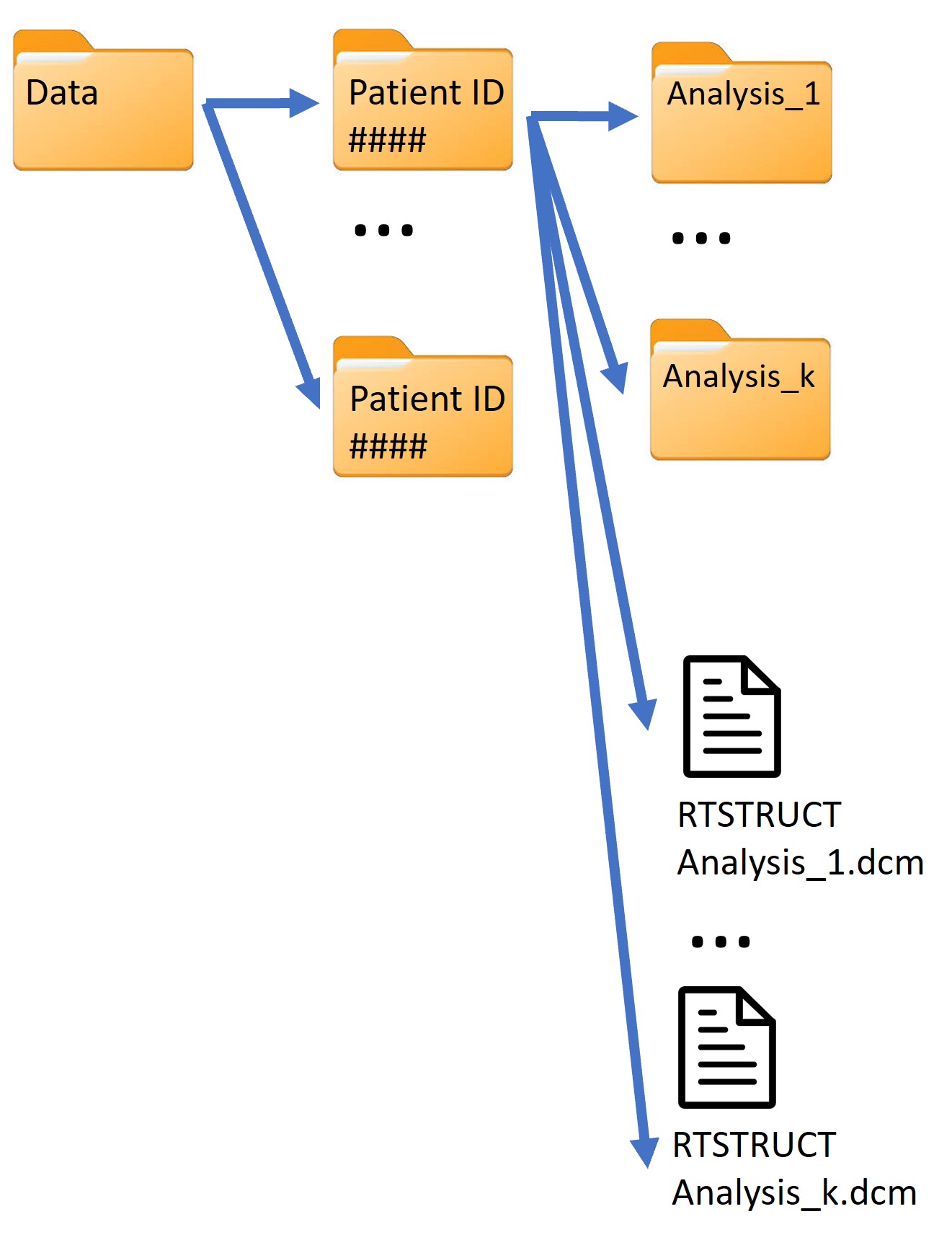
Subfolders within a study folder should follow the structure shown below:

Alternatively, subfolders can be organized in the following structure and then reorganized using the REORGANIZE module:
Options
The CHECK_FOLDER module can be configured with the following options:
verbose: Enables or disables verbose output, providing more details during execution.
timer: Enables or disables the timer, recording the module’s execution time.
inputFolder: Specifies the path to the main study folder containing subfolders with DICOM files.
with-segmentation: Indicates if subfolders contain segmentation files. Set to False if only some subfolders contain segmentation files.
log: Path to a log file for recording output details.
new_log_file: Creates a new log file. If a log file with the same name already exists, it will be overwritten.
Example Usage
The example below demonstrates how to use the CHECK_FOLDER module to verify that each subfolder within a study folder is correctly structured:
CHECK_FOLDER:  # Verify if subfolders within a study folder have the correct structure
{
    inputFolder: /path/to/study_folder
    with-segmentation: False
    log: /path/to/logs/checkfolder.log
}