F-HARMONIZE Module
The F-HARMONIZE module allows for feature harmonization to correct batch effects due to variables like scanner, center, or other batch-related factors. Harmonization can be performed:
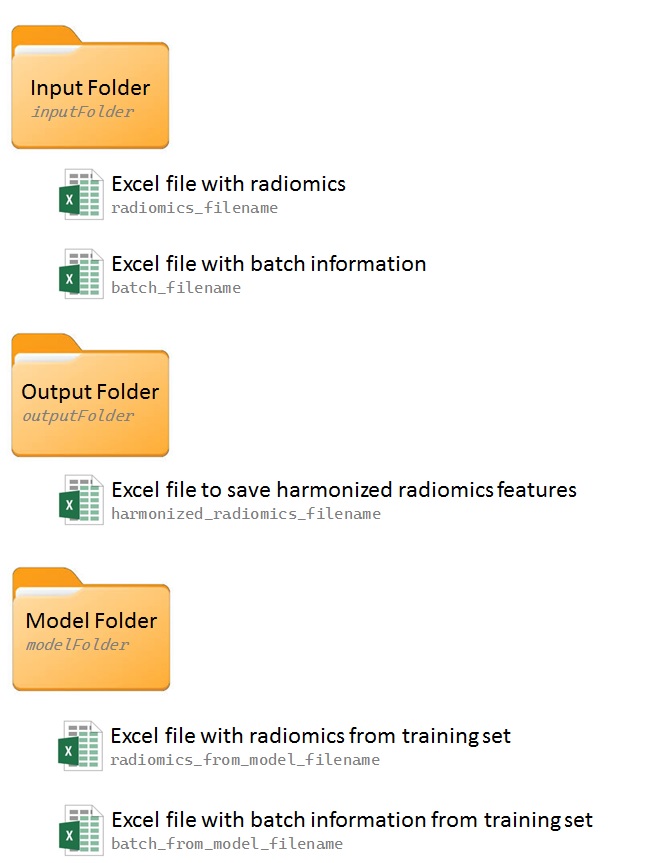
Internally, using radiomics and batch data from input Excel files (radiomics_filename and batch_filename).
Externally, using both the above files and additional radiomics and batch data from previously built models (specified using radiomics_from_model_filename and batch_from_model_filename).
Modes of Harmonization
Internal Mode (default): Harmonization occurs solely on the current radiomics file.
External Mode: New data is harmonized with a reference batch from an external radiomics model.
When mode is set to External, harmonization is performed by merging the new data with data specified in radiomics_from_model_filename. If ref_batch is not specified, data from radiomics_from_model_filename will be used as the reference batch. Otherwise, the specified ref_batch is used as the reference batch (e.g., the name of a center).
The module saves results in an output folder (outputFolder), with results defaulting to the input folder if outputFolder is not specified. For external mode, a modelFolder must be provided to store relevant files for external data harmonization.
Options
verbose: Enable or disable verbose mode.
timer: Enable or disable the timer to record execution time.
log: Path to save logs.
new_log_file: Overwrite log file if it already exists.
inputFolder: Path to the input folder.
outputFolder: Path to the output folder.
modelFolder: Path to data from a previously built model (used with mode External).
radiomics_filename: Name of the Excel file with radiomics results.
batch_file: Name of the Excel file with batch information.
harmonized_radiomics_filename: Name of the Excel file to store harmonized results (default: harmonized_radiomics.xlsx).
radiomics_from_model_filename: External radiomics file used in building a model (for mode External).
batch_from_model_filename: Batch information for radiomics_from_model_filename (for mode External).
estimates_filename: Save neuroCombat estimates (works only in mode Internal). DEPRECATED
ref_batch: Name of the batch to serve as reference.
covars: Names of additional covariates to use (must be present in batch_file and batch_from_model_filename).
mode: Specify harmonization mode: Internal (default) or External.
Batch File Structure
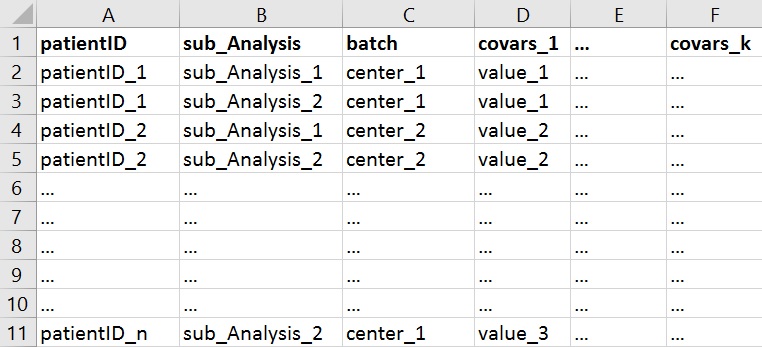
Batch Excel files should include the following columns:
patientID: Patient IDs matching those in the radiomics file.
sub_Analysis: Sub-analysis column aligning with IDs in the radiomics file.
batch: Batch information for harmonization (e.g., center or scanner).
Other covariates: Optional columns for additional covariates (e.g., gender, age group, etc.).
Example Usage
The following example demonstrates using F-HARMONIZE to perform harmonization with center_1 as the reference batch from external radiomics data:
F-HARMONIZE
{
    inputFolder: /path/to/radiomics_results
    #no output folder specify: save output in the input folder
    modelFolder: /path/to/radiomics_model
    radiomics_from_model_filename: radiomics_train.xlsx
    batch_from_model_filename: batch_train.xlsx
    radiomics_filename: radiomics.xlsx
    batch_filename: batch.xlsx
    harmonized_radiomics_filename: harmonized_radiomics.xlsx
    mode: external
    covars: gender
    ref_batch: center_1
    log: /path/to/logs/fharmonize.log
}